

在没有外部图像传感器的情况下,想要测试cypress 3065到pc端的数据通路,就需要软件生成图像直接传输给PC端,下面是具体实现过程。
以下操作都是在官方提供的的ov5640的例程上进行修改。例程路径在开发环境安装目录下:Cypress\EZ-USB FX3 SDK\1.3\firmware\cx3_examples\cycx3_uvc_ov5640,为了方便大家的理解,我尽量在原代码上进行了修改。所以代码注释量很大。
1、要想实现这一目的,首先要了解整个视频传输的数据流。
[MIPI 传感器]
↓ (MIPI CSI-2 串行数据)
[CX3/FX3 MIPI 接收模块]
↓ (解包后并行像素数据)
[CX3/FX3 MIPI FIFO]
↓ (DMA 通道搬运)
[CX3/FX3 USB 端点 FIFO (Bulk/ISO IN)]
↓ (USB 3.0/2.0 总线)
[PC USB 主控制器]
↓ (UVC 类驱动解析)
[PC 视频播放应用]
2、所以我们重点要关注的是这一部分:
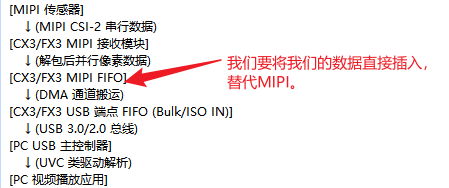
3、后续我们就围绕这一部分展开。
要实现这一目的,我们首先要替换数据源,首先将提供数据的通道换成我们的。只用将下面的代码,稍做修改。
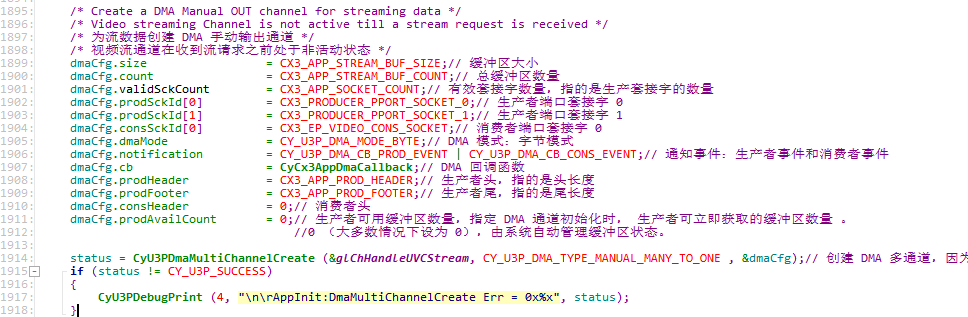
    CyU3PDmaChannelConfig_t dmaCfg; //注意要这个dma配置符改成单通道的,上面的是多通道的
    dmaCfg.size           = 4096;//这里不一定是4096,根据你软件生成的图像来安排,后面会讲怎么填
    dmaCfg.count          = UVC_STREAM_BUF_COUNT;
    dmaCfg.prodSckId      = CY_U3P_CPU_SOCKET_PROD;//注意这一改动是关键点,因为我们的数据是cpu提供的,所以生产套接字要改成这个。
    dmaCfg.consSckId      = CY_U3P_UIB_SOCKET_CONS_3;//消费套接字不需要变
    dmaCfg.dmaMode        = CY_U3P_DMA_MODE_BYTE;
    dmaCfg.notification   = CY_U3P_DMA_CB_CONS_EVENT; //触发dma回调函数的事件,由于生产是我们,所以不需要触发,所以只保留消费
    dmaCfg.cb             = UvcAppDmaCallback;
    dmaCfg.prodHeader     = 0;
    dmaCfg.prodFooter     = 0;
    dmaCfg.consHeader     = 0;
    dmaCfg.prodAvailCount = 0;
    status = CyU3PDmaChannelCreate (&glChHandleVideoStream, CY_U3P_DMA_TYPE_MANUAL_OUT, &dmaCfg);//创建一对一套接字DMA通道。
    if (status != CY_U3P_SUCCESS)
    {
        CyU3PDebugPrint (4, "ChannelCreate failed, Code=%d\r\n", apiRetStatus);
    }
这一步完成,数据通道就变成了由cpu产生数据的dma通道了。
4、下一步,我们就需要考虑怎么产生数据源了,首先要新增一个填充数据函数。
tatic CyU3PReturnStatus_t
UvcAppFillBuffers (
        CyBool_t updateData)
{
    CyU3PDmaBuffer_t	dmaInfo;
    CyU3PReturnStatus_t status;
    uint32_t			i;
    for (i = 0; i < UVC_STREAM_BUF_COUNT; i++)
    {
        status = CyU3PDmaChannelGetBuffer (&glChHandleVideoStream, &dmaInfo, CYU3P_WAIT_FOREVER);
        if (status != CY_U3P_SUCCESS)
        {
            CyU3PDebugPrint (4, "DMA Get Buffer failed, Code=%d\r\n", status);
            return status;
        }
        /* Fill the buffer, if required. This is done only the very first time the buffers are used. We are
           filling different data into each buffer and using a buffer count that does not divide the number of
           frames per buffer. This will create a changing video effect when viewing the stream.
       */
        if (updateData)//数据填充只需进行一次,后续就用同样的数据就行了,因为也只是简单测试下硬件通路
        {
            CyU3PMemSet (dmaInfo.buffer + UVC_HEADER_SIZE, (uint8_t)(0xFF - i * 0x11), UvcDataPerBuffer);//填充数据
        }
        /* Add the UVC header and commit the buffer.添加UVC标头并提交缓冲区。 */
        UvcAddHeader (dmaInfo.buffer);
        status = CyU3PDmaChannelCommitBuffer (&glChHandleVideoStream, UvcDataPerBuffer + UVC_HEADER_SIZE, 0);//是为了触发消费事件,从而进入dma回调函数。
        if (status != CY_U3P_SUCCESS)
        {
            CyU3PDebugPrint (4, "DMA Commit Buffer failed, Code=%d\r\n", status);
            return status;
        }
    }
    return status;
}
5、然后将这个函数添加进入CyCx3AppStart函数。另外我改动的时候,把start和stop函数里关于mipi和传感器部分都屏蔽了,防止有干扰(我也不知道会不有懒得管,反正用不着,就屏蔽了)。
        /* This function starts the video streaming application. It is called
         * when there is a SET_INTERFACE event for alternate interface 1
         * (in case of UVC over Isochronous Endpoint usage) or when a
         * COMMIT_CONTROL(SET_CUR) request is received (when using BULK only UVC).
         */
        /* 此函数启动视频流应用程序。当有备用接口 1 的 SET_INTERFACE 事件时调用
         *(在使用等时端点的 UVC 情况下)或当收到 COMMIT_CONTROL(SET_CUR) 请求时(当仅使用 BULK UVC 时)。
         */
CyU3PReturnStatus_t
CyCx3AppStart (
        void)
{
    uint8_t SMState = 0;
    CyU3PReturnStatus_t status = CY_U3P_SUCCESS;
    glIsApplnActive = CyTrue;
    glDmaDone		= 0;
    UvcDataInFlight     = CyFalse;
    UvcFrameBufferCount = 0;
    /* Streaming is now active. 流式处理现在处于活动状态*/
    UvcStreamActive  = CyTrue;

    /* Set the data size for each DMA buffer depending on USB connection type.
     * 根据USB连接类型设置每个DMA缓冲区的数据大小 */
    if (CyU3PUsbGetSpeed () == CY_U3P_HIGH_SPEED)
        UvcDataPerBuffer = UVC_VALID_DATA_SIZE_HS;
    else
        UvcDataPerBuffer = UVC_VALID_DATA_SIZE_HS;
    /* Place the EP in NAK mode before cleaning up the pipe. */
    /* 在清理管道之前,将 EP 置于 NAK 模式。 */
    CyU3PUsbSetEpNak (CX3_EP_BULK_VIDEO, CyTrue);
    CyU3PBusyWait (125);
    /* Reset USB EP and DMA */
    /* 重置 USB EP 和 DMA */
    CyU3PUsbFlushEp(CX3_EP_BULK_VIDEO);
    status = CyU3PDmaChannelReset (&glChHandleVideoStream);
    if (status != CY_U3P_SUCCESS)
    {
        CyU3PDebugPrint (4,"\n\rAplnStrt:ChannelReset Err = 0x%x", status);
        return status;
    }
    status = CyU3PDmaChannelSetXfer (&glChHandleVideoStream, 0);
    if (status != CY_U3P_SUCCESS)
    {
        CyU3PDebugPrint (4, "\n\rAplnStrt:SetXfer Err = 0x%x", status);
        return status;
    }
    status = UvcAppFillBuffers (UvcAppUpdateData);
    if (status != CY_U3P_SUCCESS)
    {
        //CyU3PDebugPrint (4, "UVC Buffer Fill failed, Code=%d\r\n", status);
        return status;
    }
    /* The data pattern needs to be filled into the buffers only once.
     * 数据模式只需要在缓冲区中填充一次。 */
    UvcAppUpdateData = CyFalse;
    CyU3PUsbSetEpNak (CX3_EP_BULK_VIDEO, CyFalse);
    CyU3PBusyWait (200);
    CyU3PUsbLPMDisable ();
    if (CyU3PUsbGetSpeed () == CY_U3P_SUPER_SPEED)
    {
        CyU3PUsbSetLinkPowerState (CyU3PUsbLPM_U0);
    }
//	/* Start the GPIF state machine from the start state. */
//	/* 从开始状态启动 GPIF 状态机。 */
//	CyU3PGpifSMSwitch(CX3_INVALID_GPIF_STATE, CX3_START_SCK0,
//			CX3_INVALID_GPIF_STATE, ALPHA_CX3_START_SCK0, CX3_GPIF_SWITCH_TIMEOUT);
//
//	CyU3PThreadSleep (10);
//	CyU3PGpifGetSMState(&SMState);
//	CyU3PDebugPrint (4, "\n\rAplnStrt:SMState = 0x%x",SMState);
//	CyU3PThreadSleep (10);
//
//	/* Wake Mipi interface and Image Sensor */
//	/* 唤醒 MIPI 接口和图像传感器 */
//	CyU3PMipicsiWakeup();
//
//#if USE_SENSOR_LIB
//	CyCx3_ImageSensor_Wakeup();
//#else
//	CyCx3ImageSensorWakeup();
//#endif
//
//	glMipiActive = CyTrue;
//
//#ifdef RESET_TIMER_ENABLE
//	CyU3PTimerModify (&Cx3ResetTimer, TIMER_PERIOD, 0);
//	CyU3PTimerStart (&Cx3ResetTimer);
//#endif
//
//#if USE_SENSOR_LIB
//	CyCx3_ImageSensor_Trigger_Autofocus();
//#else
//	CyCx3ImageSensorTriggerAutofocus();
//#endif
    return CY_U3P_SUCCESS;
}
void
CyCx3AppStop (
        void)
{
#ifdef CX3_DEBUG_ENABLED
    uint8_t SMState = 0;
#endif
/* Mark streaming as stopped. 将流式传输标记为已停止。*/
UvcStreamActive 	= CyFalse;
UvcDataInFlight 	= CyFalse;
UvcFrameBufferCount = 0;
UvcDataPerBuffer	= (CyU3PUsbGetSpeed () == CY_U3P_HIGH_SPEED) ? UVC_VALID_DATA_SIZE_HS : UVC_VALID_DATA_SIZE_HS;
//	/* Stop the image sensor and CX3 mipi interface */
//	/* 停止图像传感器和 CX3 mipi 接口 */
//	CyU3PMipicsiSleep();
//#if USE_SENSOR_LIB
//	CyCx3_ImageSensor_Sleep();
//#else
//	CyCx3ImageSensorSleep();
//#endif
    glMipiActive = CyFalse;
    glIsStreamingStarted = CyFalse;
//#ifdef RESET_TIMER_ENABLE
//	CyU3PTimerStop (&Cx3ResetTimer);
//#endif
//
//#ifdef CX3_DEBUG_ENABLED
//	CyU3PGpifGetSMState(&SMState);
//	CyU3PDebugPrint (4, "\n\rAplnStop:SMState = 0x%x",SMState);
//#endif
    /* Disable the GPIF interface. */
    /* 禁用 GPIF 接口。 */
//	CyU3PGpifDisable (CyFalse);
    /* Update the flag so that the application thread is notified of this. */
    /* 更新标志,以便应用程序线程得到通知。 */
    glIsApplnActive = CyFalse;
/**用于设置 USB 端点的 NAK 状态。
- NAK :USB 协议中的一种握手信号,表示“设备暂时无法处理数据传输”。
当端点返回 NAK 时,主机会暂停向该端点发送数据请求,直到端点准备就绪。 */
    CyU3PUsbSetEpNak (CX3_EP_BULK_VIDEO, CyTrue);
    CyU3PBusyWait (125);
    /* Abort and destroy the video streaming channel */
    /* Reset the channel: Set to DSCR chain starting point in PORD/CONS SCKT; set DSCR_SIZE field in DSCR memory*/
    /* 中止并销毁视频流通道 */
    /* 重置通道:设置为 PORD/CONS SCKT 中的 DSCR 链起点;在 DSCR 内存中设置 DSCR_SIZE 字段 */
    CyU3PDmaChannelReset(&glChHandleVideoStream);
    CyU3PThreadSleep(25);
    /* Flush the endpoint memory */
    /* 刷新端点内存 */
    CyU3PUsbFlushEp(CX3_EP_BULK_VIDEO);
    CyU3PUsbSetEpNak (CX3_EP_BULK_VIDEO, CyFalse);
    CyU3PBusyWait (200);
    /* Clear the stall condition and sequence numbers if ClearFeature. */
    /* 如果是 ClearFeature,则清除暂停条件和序列号。 */
    if (glIsClearFeature)
    {
        CyU3PUsbStall (CX3_EP_BULK_VIDEO, CyFalse, CyTrue);
        glIsClearFeature = CyFalse;
    }
    glDmaDone = 0;
    /* Enable USB LPM */
    /* 启用 USB LPM */
    CyU3PUsbLPMEnable ();
}
6、下一步就是关键了,需要保证视频流数据的持续传输。由于数据是我们产生的,不是像传感器一样不停的产生新数据忘dmabuffer里灌,为了方便我们在UvcAppFillBuffers函数里是将每两行视频数据组成一个dma数据包,并不是像正常运行一样灌满了再进行一次dma传输。所以就需要改造dma回调函数和添加uvc头的函数,这两个函数原有的一些判断条件并不适用。
void
UvcAppDmaCallback (
        CyU3PDmaChannel   *chHandle,
        CyU3PDmaCbType_t   type,
        CyU3PDmaCBInput_t *input)
{
        CyU3PDmaBuffer_t dmaBuffer;
        CyU3PReturnStatus_t status = CY_U3P_SUCCESS;

        if (type == CY_U3P_DMA_CB_CONS_EVENT)//注意现在只有消费事件了,所以要把判断条件改了
        {
            /* Set flag indicating that host has started to fetch video data. 设置指示主机已开始获取视频数据的标志。*/
            UvcDataInFlight = CyTrue;

            /* This is a produce event notification to the CPU. This notification is
             * received upon reception of every buffer. The buffer will not be sent
             * out unless it is explicitly committed. The call shall fail if there
             * is a bus reset / usb disconnect or if there is any application error. */
            /* 这是向 CPU 发出的生产事件通知。每次收到缓冲区时都会收到此通知。除非明确提交,否则缓冲区不会被发送出去。
             * 如果有总线重置/USB 断开连接或任何应用程序错误,调用将失败。 */
        /*用于从多通道 DMA 通道获取可用的缓冲区。
        - 参数 1 : chHandle - DMA 多通道句柄(这里是 glChHandleUVCStream ,视频流的 DMA 通道)
        - 参数 2 : &dmaBuffer - 输出参数,用于存储获取到的缓冲区信息(包含缓冲区地址、大小等)
        - 参数 3 : CYU3P_NO_WAIT - 等待模式,表示非阻塞调用(如果没有可用缓冲区,立即返回错误,不等待) */
            status = CyU3PDmaChannelGetBuffer(chHandle, &dmaBuffer, CYU3P_NO_WAIT);
            //while (status == CY_U3P_SUCCESS)
            if(status == CY_U3P_SUCCESS)
            {
                /* Add Headers*/
                /* 添加头信息 */
                /*dmaBuffer.count :表示当前 DMA 缓冲区中实际填充的数据字节数。
                CX3_APP_DATA_BUF_SIZE :宏定义的标准 DMA 缓冲区大小(如 4096 字节,取决于具体配置)。
                当视频数据的最后一部分不足以填满整个标准缓冲区时,
                 dmaBuffer.count 会小于 CX3_APP_DATA_BUF_SIZE ,此时该缓冲区就是一帧的 结束包 。
                */
//				if (dmaBuffer.count < CX3_APP_DATA_BUF_SIZE)
//				{
//					/*添加结束头 :调用 CyCx3AppAddHeader 并传入 CX3_APP_HEADER_EOF ,标记这是帧的结束包。*/
//					CyCx3AppAddHeader ((dmaBuffer.buffer - CX3_APP_PROD_HEADER), CX3_APP_HEADER_EOF);
//				}
//				else
//				{
//					/*添加普通头 :调用 CyCx3AppAddHeader 并传入 CX3_APP_HEADER_FRAME ,标记这是帧的中间包。*/
//					CyCx3AppAddHeader ((dmaBuffer.buffer - CX3_APP_PROD_HEADER), CX3_APP_HEADER_FRAME);
//				}
            /* Update the UVC header in the buffer. There is no need to touch the actual video data as it is fixed.
         * 更新缓冲区中的UVC标头。无需触摸实际视频数据,因为它是固定的 */
                UvcAddHeader (dmaBuffer.buffer);
                /* Commit Buffer to USB*/
                /* 将缓冲区提交到 USB */
                status = CyU3PDmaChannelCommitBuffer (chHandle, (UvcDataPerBuffer + 12), 0);
                if (status != CY_U3P_SUCCESS)
                {
                    CyU3PEventSet(&glCx3Event, CX3_DMA_RESET_EVENT, CYU3P_EVENT_OR);
                    //break;
                }
                else
                {
                    glDmaDone++;
                }
             //status = CyU3PDmaMultiChannelGetBuffer(chHandle, &dmaBuffer, CYU3P_NO_WAIT);
            }
        }
        else if (type == CY_U3P_DMA_CB_CONS_EVENT)
        {
            /* 这是一个消费者事件通知,当 USB 主机消耗了一个缓冲区时调用。 */
            glDmaDone--;
            glBuffcount++;
            glIsStreamingStarted = CyTrue;
//			glFailFrameCount	 = 0;
        }
}
static void
UvcAddHeader (
        uint8_t *buffer_p)
{
    /* Copy header to buffer */
    CyU3PMemCopy (buffer_p, (uint8_t *)glUVCHeader, UVC_HEADER_SIZE);
    /* Check if we have completed the number of buffers required for this frame. 检查是否已完成此帧所需的缓冲区数。*/
    UvcFrameBufferCount++;
    if (((CyU3PUsbGetSpeed () == CY_U3P_HIGH_SPEED) && (UvcFrameBufferCount == UVC_BUF_PER_FRAME_HS)) ||
            ((CyU3PUsbGetSpeed () == CY_U3P_SUPER_SPEED) && (UvcFrameBufferCount == UVC_BUF_PER_FRAME_HS)))
    {
        /* Indicate End of Frame in the buffer 指示缓冲区中的帧结束*/
        buffer_p[1] |=	CX3_APP_HEADER_EOF;
        /* Modify UVC header to toggle Frame ID from the next buffer onwards. 修改UVC标头以从下一个缓冲区开始切换帧ID。*/
        glUVCHeader[1] ^= CX3_APP_HEADER_FRAME_ID;
        /* Clear the buffers per frame counter. */
        UvcFrameBufferCount = 0;
    }
}
7、最后把代码改动后定义的宏和变量,补充在这给大家参考,可以根据需求更改
#define COLOR_TEST
#ifdef COLOR_TEST
CyU3PDmaChannel   glChHandleVideoStream;        /* DMA MANUAL_OUT (Video Stream) channel handle.DMA MANUAL_OUT  CYUSB3014内部arm核生成测试视频通道句柄。*/
#define SENSOR_WIDTH		640      /* 宽度*/
#define SENSOR_HEIGHT		480      /* 宽度*/
#define UVC_BUF_PER_FRAME_HS                    (SENSOR_HEIGHT/2)
#define UVC_STREAM_BUF_COUNT                    (14)
#define UVC_HEADER_SIZE                         (12)
#define UVC_HEADER_EOF                          (uint8_t)(1 << 1)       /* End of frame indication */
#define EP_VIDEO_STREAM                         (0x83)          /* Video streaming endpoint: 3-IN. */
#define UVC_HEADER_FRAME_ID                     (uint8_t)(1 << 0)       /* Frame ID toggle bit */
/* Event to restart a video frame that has taken too long. 事件以重新启动耗时过长的视频帧*/
#define DMA_RESET_EVENT                         (1<<4)
/* Micro-frame duration in micro-seconds.微帧持续时间(以微秒为单位)。 */
#define USB_MICROFRAME_DURATION                 (125)
/* Valid data size in each DMA buffer at HS: 2 HS lines = 640 * 2 * 2,    HS时每个DMA缓冲区中的有效数据大小:2 HS行=640*2*2*/
#ifdef RGB
#define UVC_VALID_DATA_SIZE_HS                  (SENSOR_WIDTH*2*3)
#else
#define UVC_VALID_DATA_SIZE_HS                  (SENSOR_WIDTH*2*2)
#endif
static volatile uint32_t UvcFrameBufferCount = 0;       /* Number of buffers committed for the current frame.为当前帧提交的缓冲区数*/
static volatile uint16_t UvcDataPerBuffer    = 0;       /* Size of data per DMA buffer. 每个DMA缓冲区的数据大小。*/
static volatile CyBool_t UvcAppUpdateData    = CyTrue;  /* Whether data in DMA buffer needs to be updated.*/
static volatile CyBool_t UvcDataInFlight     = CyFalse; /* Whether host has started reading UVC data. 主机是否已开始读取UVC数据。*/
static volatile CyBool_t UvcStreamActive     = CyFalse; /* Whether the UVC video stream is active. UVC视频流是否处于活动状态*/
static volatile CyBool_t UvcClearEpHalt      = CyFalse; /* Flag to indicate that a CLEAR EP HALT request is active.*/
#endif
8、对了官方例程只有640*480的描述符,如果要输出其它大小的图像,需要同步更改描述符和UVC Probe Control Setting这一部分哦。
转载自CSDN-专业IT技术社区
原文链接:https://blog.csdn.net/qwazsedxc/article/details/158502604

