

把 Web 组件放在可滚动的外层容器里,用户滑动时谁先滚动、谁后滚动?默认行为往往让用户困惑。本文介绍两种嵌套滚动方案。
大白话讲问题
外层 Scroll → Web 组件(内容长)→ Native 卡片列表。用户向下滑:先滚 Web 内容?还是先滚外层?Web 滚完了才轮到外层?这就是嵌套滚动要解决的问题。
方案一:nestedScroll 属性(简单版)
import { webview } from '@kit.ArkWeb';

@Entry
@ComponentV2
struct NestedScrollSimple {
  private scrollerForScroll: Scroller = new Scroller();
  controller: webview.WebviewController = new webview.WebviewController();
  @Local arr: Array<number> = [];

  aboutToAppear(): void {
    for (let i = 0; i < 10; i++) {
      this.arr.push(i);
    }
  }

  build() {
    Scroll(this.scrollerForScroll) {
      Column() {
        Web({ src: $rawfile('scroll.html'), controller: this.controller })
          .nestedScroll({
            scrollUp: NestedScrollMode.PARENT_FIRST,  // 向上:外层优先
            scrollDown: NestedScrollMode.SELF_FIRST,  // 向下:Web 自身优先
          })
          .height('100%')

        Repeat<number>(this.arr)
          .each((item: RepeatItem<number>) => {
            Text('Native 卡片')
              .width('100%')
              .height('40%')
              .backgroundColor(0x330000FF)
              .fontSize(16)
              .textAlign(TextAlign.Center)
          })
      }
    }
  }
}
NestedScrollMode 枚举值说明:
| 枚举值 | 含义 |
|---|---|
SELF_FIRST | 子组件优先,到边界后外层滚 |
PARENT_FIRST | 外层优先,外层到底后子组件滚 |
SELF_ONLY | 只有子组件滚,外层不联动 |
PARALLEL | 子组件和外层同时滚动 |
方案二:onScrollFrameBegin 精细控制(进阶版)
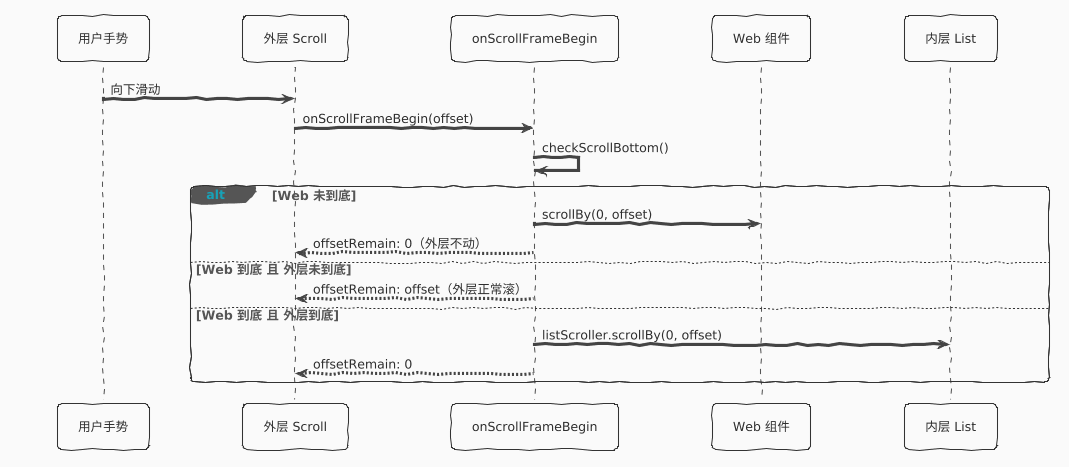
import { webview } from '@kit.ArkWeb';

@Entry
@ComponentV2
struct NestedScrollAdvanced {
  private scroller: Scroller = new Scroller();
  private listScroller: Scroller = new Scroller();
  private webController: webview.WebviewController = new webview.WebviewController();
  private isWebAtEnd: boolean = false;
  private webHeight: number = 0;
  @Local arr: Array<number> = [];

  aboutToAppear(): void {
    for (let i = 0; i < 10; i++) {
      this.arr.push(i);
    }
  }

  getWebHeight(): void {
    try {
      this.webController.runJavaScriptExt('window.innerHeight', (error, result) => {
        if (error || !result) return;
        if (result.getType() === webview.JsMessageType.NUMBER) {
          this.webHeight = result.getNumber();
        }
      });
    } catch (error) {
      console.error('getWebHeight error:', error);
    }
  }

  checkScrollBottom(): void {
    this.isWebAtEnd = false;
    try {
      const offset = this.webController.getPageOffset();
      const pageHeight = this.webController.getPageHeight();
      if (offset.y + this.webHeight >= pageHeight) {
        this.isWebAtEnd = true;
      }
    } catch (err) {
      console.error(`checkScrollBottom failed! Code: ${err.code}, Message: ${err.message}`);
    }
  }

  build() {
    Scroll(this.scroller) {
      Column() {
        Web({ src: $rawfile('scroll.html'), controller: this.webController })
          .height('100%')
          .bypassVsyncCondition(WebBypassVsyncCondition.SCROLLBY_FROM_ZERO_OFFSET)
          .onPageEnd(() => {
            // 禁止 Web 响应 EVENT 类型滚动,由外层统一分发
            this.webController.setScrollable(false, webview.ScrollType.EVENT);
            this.getWebHeight();
          })
          .onGestureRecognizerJudgeBegin((event: BaseGestureEvent,
            current: GestureRecognizer, others: Array<GestureRecognizer>) => {
            // 拒绝 Web 内置 PAN 手势,让外层 Scroll 接管
            if (current.isBuiltIn() &&
                current.getType() === GestureControl.GestureType.PAN_GESTURE) {
              return GestureJudgeResult.REJECT;
            }
            return GestureJudgeResult.CONTINUE;
          })

        List({ scroller: this.listScroller }) {
          Repeat<number>(this.arr)
            .each((item: RepeatItem<number>) => {
              ListItem() {
                Text('Native 卡片')
                  .width('100%')
                  .height('40%')
                  .backgroundColor(0x330000FF)
                  .fontSize(16)
                  .textAlign(TextAlign.Center)
              }
            })
        }
        .height('100%')
        .maintainVisibleContentPosition(true)
        .enableScrollInteraction(false) // List 不响应手势,由外层分发
      }
    }
    .onScrollFrameBegin((offset: number, state: ScrollState) => {
      this.checkScrollBottom();

      if (offset > 0) {
        // 向下滑
        if (!this.isWebAtEnd) {
          this.webController.scrollBy(0, offset);
          return { offsetRemain: 0 };
        } else if (this.scroller.isAtEnd()) {
          this.listScroller.scrollBy(0, offset);
          return { offsetRemain: 0 };
        }
      } else if (offset < 0) {
        // 向上滑
        if (this.listScroller.currentOffset().yOffset > 0) {
          this.listScroller.scrollBy(0, offset);
          return { offsetRemain: 0 };
        } else if (this.scroller.currentOffset().yOffset <= 0) {
          this.webController.scrollBy(0, offset);
          return { offsetRemain: 0 };
        }
      }
      return { offsetRemain: offset };
    })
  }
}
两种方案对比
| nestedScroll 属性 | onScrollFrameBegin 回调 | |
|---|---|---|
| 复杂度 | 低,几行配置 | 高,手动管理状态 |
| 灵活性 | 有限 | 极高,完全自定义 |
| 适用场景 | 简单优先级控制 | 多层嵌套、精细边界控制 |
转载自CSDN-专业IT技术社区
原文链接:https://blog.csdn.net/qq_33681891/article/details/161185228

