

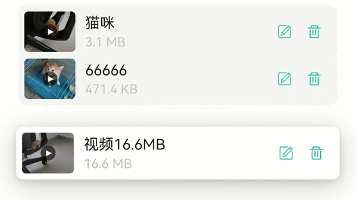
一、前言
本文总结如何实现一个流畅的列表拖拽排序效果,类似各大音乐APP的歌单排序功能。
二、实现思路
核心思路:拖拽时只做视觉位移,松手后才真正改变数据顺序
三、需要改动的地方
1. 数据状态准备
在 data 中添加拖拽状态管理:
data() {
  return {
    // 你的列表数据
    list: [],

    // 拖拽状态
    dragState: {
      isDragging: false,     // 是否正在拖拽
      startY: 0,             // 起始Y坐标
      startIndex: -1,        // 拖拽起始索引
      hoverIndex: -1,        // 当前悬停索引
      movedY: 0              // 移动的距离
    },

    itemHeight: 80          // 每项的高度(px)
  }
}
2. 模板修改
给列表项添加:
- 动态 class(标记拖拽中的项)
- 动态 style(控制位移)
- 触摸事件
<template>
  <div class="list-container">
    <div
      v-for="(item, index) in list"
      :key="item.id"
      class="list-item"
      :class="{ 'dragging': dragState.startIndex === index && dragState.isDragging }"
      :style="getItemStyle(index)"
      @touchstart.stop="onTouchStart($event, index)"
      @touchmove.stop.prevent="onTouchMove($event, index)"
      @touchend.stop="onTouchEnd($event, index)"
    >
      <!-- 列表项内容 -->
      <div class="item-content">{{ item.name }}</div>
    </div>
  </div>
</template>
3. 样式修改
添加过渡动画和拖拽状态样式:
.list-container {
  position: relative;
}

.list-item {
  /* 基础样式 */
  padding: 16px;
  margin-bottom: 12px;
  background: #f5f5f5;
  border-radius: 8px;

  /* 关键:过渡动画 */
  transition: transform 0.4s cubic-bezier(0.25, 0.8, 0.25, 1),
              box-shadow 0.3s ease;
  position: relative;
  will-change: transform;
}

.list-item.dragging {
  /* 拖拽中的样式 */
  background: #fff;
  box-shadow: 0 4px 20px rgba(0, 0, 0, 0.2);
  z-index: 100;  /* 拖拽项在最上层 */
}
4. 添加核心方法
方法一:计算每个项的样式
getItemStyle(index) {
  if (!this.dragState.isDragging) {
    return '';
  }

  const { startIndex, hoverIndex, movedY } = this.dragState;
  const itemHeight = this.itemHeight;

  // 拖拽中的项:跟随手指移动
  if (index === startIndex) {
    return `transform: translateY(${movedY}px) scale(1.02); z-index: 100; transition: none;`;
  }

  // 其他项:让开位置
  if (startIndex < hoverIndex) {
    // 向下拖拽
    if (index > startIndex && index <= hoverIndex) {
      return `transform: translateY(-${itemHeight}px);`;
    }
  } else if (startIndex > hoverIndex) {
    // 向上拖拽
    if (index >= hoverIndex && index < startIndex) {
      return `transform: translateY(${itemHeight}px);`;
    }
  }

  return '';
}
方法二:拖拽开始
onTouchStart(e, index) {
  this.dragState.isDragging = true;
  this.dragState.startIndex = index;
  this.dragState.hoverIndex = index;
  this.dragState.startY = e.touches[0].clientY;
  this.dragState.movedY = 0;
}
方法三:拖拽移动
onTouchMove(e, index) {
  if (!this.dragState.isDragging) return;

  const currentY = e.touches[0].clientY;
  const deltaY = currentY - this.dragState.startY;
  this.dragState.movedY = deltaY;

  // 计算当前悬停位置
  const offsetIndex = Math.round(deltaY / this.itemHeight);
  let newHoverIndex = this.dragState.startIndex + offsetIndex;

  // 边界处理
  newHoverIndex = Math.max(0, Math.min(newHoverIndex, this.list.length - 1));

  if (newHoverIndex !== this.dragState.hoverIndex) {
    this.dragState.hoverIndex = newHoverIndex;
  }
}
方法四:拖拽结束
onTouchEnd(e, index) {
  const { startIndex, hoverIndex } = this.dragState;

  // 先重置拖拽状态(触发归位动画)
  this.dragState.isDragging = false;
  this.dragState.movedY = 0;

  // 真正改变数据顺序
  if (startIndex !== hoverIndex && hoverIndex >= 0) {
    const item = this.list.splice(startIndex, 1)[0];
    this.list.splice(hoverIndex, 0, item);
  }

  // 清理状态
  this.dragState.startIndex = -1;
  this.dragState.hoverIndex = -1;
}
四、完整示例
<template>
  <div class="page">
    <h3>我的歌单</h3>

    <div class="list-container">
      <div
        v-for="(song, index) in songList"
        :key="song.id"
        class="song-item"
        :class="{ 'dragging': dragState.startIndex === index && dragState.isDragging }"
        :style="getItemStyle(index)"
        @touchstart.stop="onTouchStart($event, index)"
        @touchmove.stop.prevent="onTouchMove($event, index)"
        @touchend.stop="onTouchEnd($event, index)"
      >
        <div class="song-cover">{{ song.emoji }}</div>
        <div class="song-info">
          <div class="song-name">{{ song.name }}</div>
          <div class="song-artist">{{ song.artist }}</div>
        </div>
      </div>
    </div>
  </div>
</template>

<script>
export default {
  data() {
    return {
      songList: [
        { id: 1, name: '晴天', artist: '周杰伦', emoji: '🎵' },
        { id: 2, name: '稻香', artist: '周杰伦', emoji: '🎶' },
        { id: 3, name: '七里香', artist: '周杰伦', emoji: '🎸' },
        { id: 4, name: '夜曲', artist: '周杰伦', emoji: '🌙' },
        { id: 5, name: '青花瓷', artist: '周杰伦', emoji: '🏺' }
      ],
      dragState: {
        isDragging: false,
        startY: 0,
        startIndex: -1,
        hoverIndex: -1,
        movedY: 0
      },
      itemHeight: 76
    }
  },
  methods: {
    getItemStyle(index) {
      if (!this.dragState.isDragging) return '';

      const { startIndex, hoverIndex, movedY } = this.dragState;

      if (index === startIndex) {
        return `transform: translateY(${movedY}px) scale(1.02); z-index: 100; transition: none;`;
      }

      if (startIndex < hoverIndex) {
        if (index > startIndex && index <= hoverIndex) {
          return `transform: translateY(-${this.itemHeight}px);`;
        }
      } else if (startIndex > hoverIndex) {
        if (index >= hoverIndex && index < startIndex) {
          return `transform: translateY(${this.itemHeight}px);`;
        }
      }
      return '';
    },

    onTouchStart(e, index) {
      this.dragState.isDragging = true;
      this.dragState.startIndex = index;
      this.dragState.hoverIndex = index;
      this.dragState.startY = e.touches[0].clientY;
      this.dragState.movedY = 0;
    },

    onTouchMove(e, index) {
      if (!this.dragState.isDragging) return;

      const deltaY = e.touches[0].clientY - this.dragState.startY;
      this.dragState.movedY = deltaY;

      const offsetIndex = Math.round(deltaY / this.itemHeight);
      let newHoverIndex = this.dragState.startIndex + offsetIndex;
      newHoverIndex = Math.max(0, Math.min(newHoverIndex, this.songList.length - 1));

      if (newHoverIndex !== this.dragState.hoverIndex) {
        this.dragState.hoverIndex = newHoverIndex;
      }
    },

    onTouchEnd(e, index) {
      const { startIndex, hoverIndex } = this.dragState;

      this.dragState.isDragging = false;
      this.dragState.movedY = 0;

      if (startIndex !== hoverIndex && hoverIndex >= 0) {
        const item = this.songList.splice(startIndex, 1)[0];
        this.songList.splice(hoverIndex, 0, item);
      }

      this.dragState.startIndex = -1;
      this.dragState.hoverIndex = -1;
    }
  }
}
</script>

<style scoped>
.page {
  padding: 20px;
}

.list-container {
  position: relative;
  margin-top: 20px;
}

.song-item {
  display: flex;
  align-items: center;
  padding: 16px;
  margin-bottom: 12px;
  background: #f5f5f5;
  border-radius: 10px;
  transition: transform 0.4s cubic-bezier(0.25, 0.8, 0.25, 1),
              box-shadow 0.3s ease;
  position: relative;
  will-change: transform;
}

.song-item.dragging {
  background: #fff;
  box-shadow: 0 4px 20px rgba(0, 0, 0, 0.15);
  z-index: 100;
}

.song-cover {
  font-size: 32px;
  margin-right: 12px;
}

.song-name {
  font-size: 16px;
  font-weight: 500;
}

.song-artist {
  font-size: 13px;
  color: #999;
  margin-top: 4px;
}
</style>
转载自 CSDN-专业IT技术社区
原文链接:https://blog.csdn.net/qq_35901863/article/details/163338200

