

Hive 复杂数据类型有三种,分别是Array Map Struct
1、Array的使用
create table tableName(
......
colName array<基本类型>
......
)
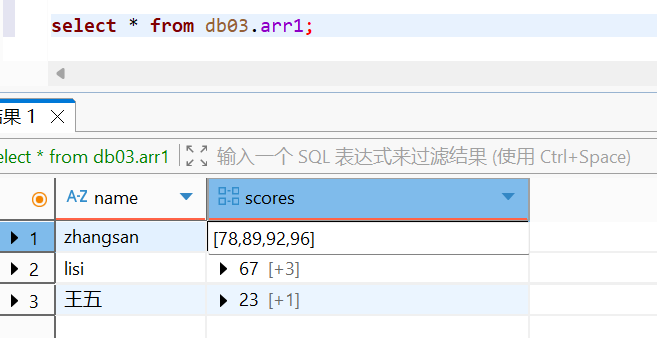
说明:下标从0开始,越界不报错,以null代替
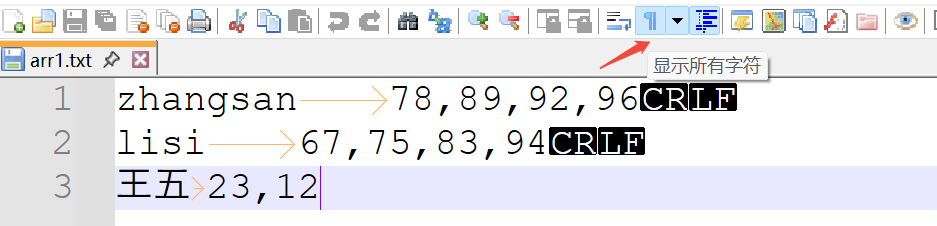
准备数据:
zhangsan	78,89,92,96
lisi	67,75,83,94
王五	23,12
这里得保证字段之间是制表符,然后数组之间是逗号
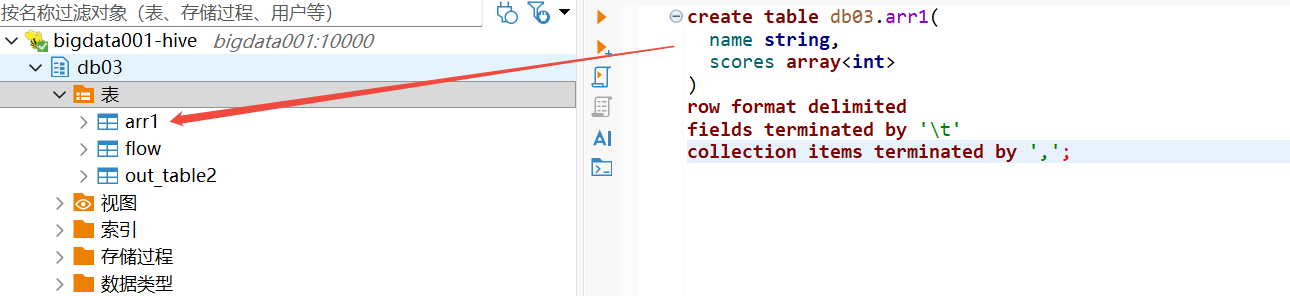
根据数据格式,新建对应的表:
create table db03.arr1(
  name string,
  scores array<int>
)
row format delimited
fields terminated by '\t'
collection items terminated by ',';
加载数据:
load data local inpath '/home/hivedata/arr1.txt' into table db03.arr1;
select * from db03.arr1;
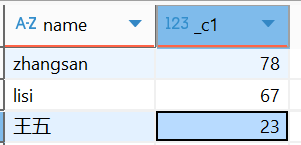
需求1:查询每一个学生的第一个成绩
select name,scores[0] from arr1;
需求2:查询拥有三科成绩的学生的第二科成绩
select name,scores[1] from arr1 where size(scores) >=3;
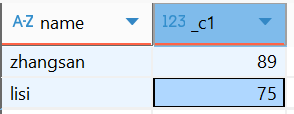
需求3:查询所有学生的总成绩
select name,scores[0]+scores[1]+nvl(scores[2],0)+nvl(scores[3],0) from arr1;
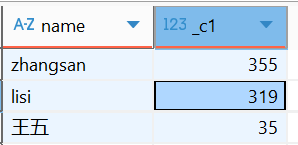
需求4:查询每个人的最后一科的成绩
select name,scores[size(scores)-1] from arr1;
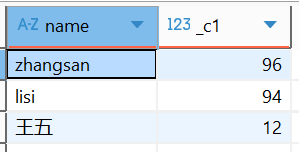
2、展开函数的使用 explode
为什么学这个,因为我们想把数据,变为如下格式:
zhangsan        78
zhangsan        89
zhangsan        92
zhangsan        96
lisi	67
lisi	75
lisi	83
lisi	94
王五	23
王五	12
explode 专门用于炸集合。
select explode(scores) from arr1;

col
78
89
92
96
67
75
83
94
23
12
这里我们想统计合计,结果这样写报错了
select name,explode(scores) from arr1
FAILED: SemanticException [Error 10081]: UDTF's are not supported outside the SELECT clause, nor nested in expressions
我们需要使用下面得方法进行计算合计
-- lateral view:虚拟表。
会将UDTF函数生成的结果放到一个虚拟表中,然后这个虚拟表会和输入行进行join来达到数据聚合的目的。
具体使用:
select name,cj from arr1 lateral view explode(scores) mytable as cj;
解释一下:
lateral view explode(scores) 形成一张虚拟的表,表名需要自己起
里面的列有几列,就起几个别名,其他的就跟正常的虚拟表一样了。
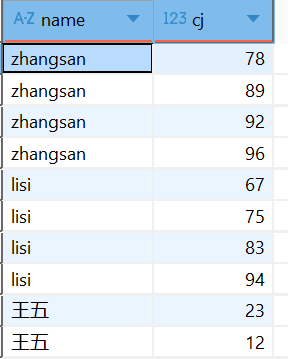
然后我们在计算每个人的总分
select name,sum(cj)
from arr1 lateral view explode(scores) mytable as cj group by name;

等同于如下写法:
select name,sum(score) from
   (select name,score
    from arr1 lateral view explode(scores) myscore as score
) t group by name;
3、Map的使用
语法格式:
create table tableName(
.......
colName map<T,T>
......
)
上案例:
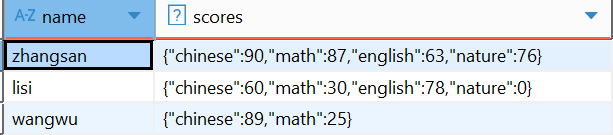
zhangsan	chinese:90,math:87,english:63,nature:76
lisi	chinese:60,math:30,english:78,nature:0
wangwu	chinese:89,math:25
建表:
create table db03.map1(
  name string,
  scores map<string,int>
)
row format delimited
fields terminated by '\t'
collection items terminated by ','
map keys terminated by ':';
加载数据:
load data local inpath '/home/hivedata/map1.txt' into table db03.map1;
查看数据
select * from db03.map1;
需求1:查询数学大于35分的学生的英语和自然成绩
select name,scores['english'],scores['nature'] from map1
where scores['math'] > 35;
需求2 :查看每个人的前两科的成绩总和
select name,scores['chinese']+scores['math'] from map1;
需求3:将数据展示如下
-- 展开效果
zhangsan chinese 90
zhangsan math 87
zhangsan english 63
zhangsan nature 76
select name,subject,cj
from map1 lateral view explode(scores) mytable as subject,cj ;
需求4:统计每个人的总成绩
select name,sum(cj)
from map1 lateral view explode(scores) mytable as subject,cj  group by name;

假如根据总成绩降序排序
select name,sum(score) sumScore
from map1 lateral view explode(scores) myscore as subject,score
group by name order by sumScore desc;

子查询写法:
select name,sum(score) from (
    select name,subject,score from map1 lateral view explode(scores) mytable as subject,score
     ) a
group by name;
需求5:行转列
-- 将下面的数据格式
zhangsan        chinese 90
zhangsan        math    87
zhangsan        english 63
zhangsan        nature  76
lisi    chinese 60
lisi    math    30
lisi    english 78
lisi    nature  0
wangwu  chinese 89
wangwu  math    25
wangwu  english 81
wangwu  nature  9
-- 转成:
zhangsan chinese:90,math:87,english:63,nature:76
lisi chinese:60,math:30,english:78,nature:0
wangwu chinese:89,math:25,english:81,nature:9
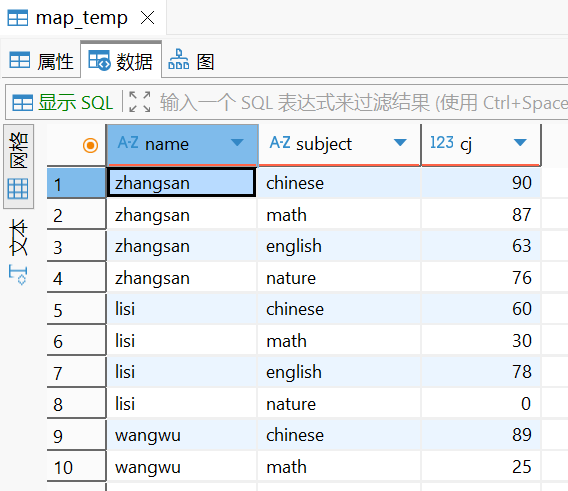
新建表
create table map_temp as
select name,subject,cj
from map1 lateral view explode(scores) mytable as subject,cj ;
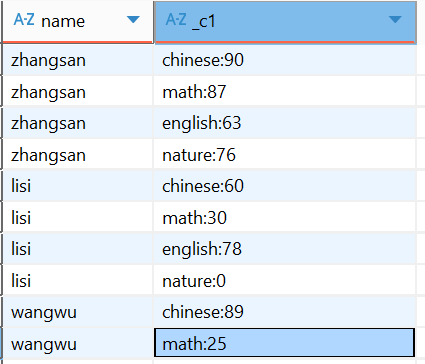
先将学科和成绩形成一个kv对,其实就是字符串拼接
--使用concat函数,进行字符串拼接
select name,concat(subject,":",cj) from map_temp;
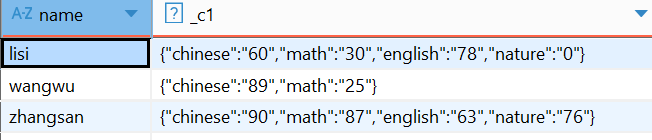
-- collect_set() 将分组的数据变成一个set集合。里面的元素是不可重复的。
select name,collect_set(concat(subject,":",cj)) from map_temp
group by name;

-- concat_ws(分隔符,集合) : 将集合中的所有元素通过分隔符变为字符串。
select name,concat_ws(",",collect_set(concat(subject,":",cj)))
from map_temp group by name;

--将字符串变为map集合 使用一个函数 str_to_map
select name,str_to_map(concat_ws(",",collect_set(concat(subject,":",cj))))
from map_temp
group by name;
4、Struct结构体
create table tableName(
........
colName struct<subName1:Type,subName2:Type,........>
........
)

有点类似于java类
调用的时候直接.
colName.subName
数据准备:
struct1.txt
zhangsan	90,87,63,76
lisi	60,30,78,0
wangwu	89,25,81,9
创建表:
create table if not exists struct1(
    name string,
    score struct<chinese:int,math:int,english:int,natrue:int>
)
row format delimited
fields terminated by '\t'
collection items terminated by ',';
加载数据:
load data local inpath '/home/hivedata/struct1.txt' into table struct1;
查看数据,有点像map:

查询数学大于35分的学生的英语和语文成绩
select name, score.english,score.chinese
from struct1
where score.math > 35;

转载自 CSDN-专业IT技术社区
原文链接:https://blog.csdn.net/bbj12345678/article/details/164094746

