

uni.request文档:https://uniapp.dcloud.net.cn/api/request/request.html#request
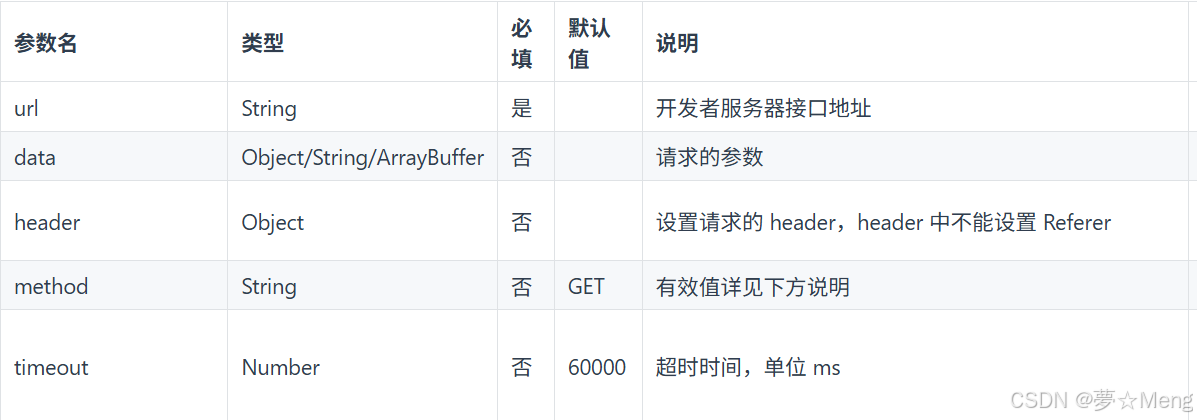
完成代码
import setting from '@/config'
// 接口地址
const baseUrl = setting.baseUrl
// 超时时间
const timeout = 6000

/**
 * 请求封装
 * @param {string} url 接口路径
 * @param {object} data 请求参数
 * @param {string} method 请求方式 默认 POST
 * @returns {Promise}
 */
const req = (url, data = {}, method = 'POST') => {
  return new Promise((resolve, reject) => {
    // 设置请求头
    uni.request({
      url: baseUrl + url,
      data: data,
      method: method,
      timeout: timeout,
      header: {
        'Authorization': uni.getStorageSync('token') || '',
        'Content-Type': 'application/json'
      },
      success: res => {
        // http 状态非200
        if (res.statusCode !== 200) {
          uni.showToast({
            title: `网络错误${res.statusCode}`,
            icon: 'none'
          })
          return reject(res)
        }
        const result = res.data
        // token失效 业务code401
        if (result.code === 401) {
          uni.showToast({
            title: '登录过期,请重新登录',
            icon: 'none'
          })
          // 清理本地缓存
          uni.clearStorageSync()
          uni.navigateTo({
            url: '/pages/login'
          })
          return reject(result)
        }
        // 权限不足
        if (result.code === 403) {
          uni.showToast({
            title: result.msg || '没有访问权限',
            icon: 'none'
          })
          return reject(result)
        }
        // 参数错误
        if (result.code === 400) {
          uni.showToast({
            title: result.msg || '参数错误',
            icon: 'none'
          })
          return reject(result)
        }
        resolve(result)
      },
      fail: err => {
        uni.showToast({
          title: '网络异常,请检查网络',
          icon: 'none'
        })
        reject(err)
      }
    })
  })
}

export default req
接口封装
import req from "@/utils/request"

export const getConfigAPI = (param) => {
	return req(
		'/getConfig',param
	)
}
接口调用
<script setup>
import { ref } from 'vue';
import { getConfigAPI } from '@/api/modules/login';
import { onShow } from '@dcloudio/uni-app'

const configData = ref()
const getConfigData = async () => {
	configData.value = await getConfigAPI()
}

onShow ( async () => {
	await getConfigData()
})
</script>
转载自 CSDN-专业IT技术社区
原文链接:https://blog.csdn.net/qq_51554230/article/details/164056103

